
You have probably seen the term DTF Gangsheet floating around print shop forums and supplier catalogs. Maybe you have even ordered a few, but if you are like many small apparel brands, you are still treating gangsheets as an afterthought. The truth is, how you build your gangsheet directly affects your material costs, your production speed, and ultimately your bottom line. This guide is not about the basics of DTF printing; it is about the strategic decisions that separate a profitable shop from one that is constantly scrambling to fill orders.
What Exactly Is a DTF Gangsheet?
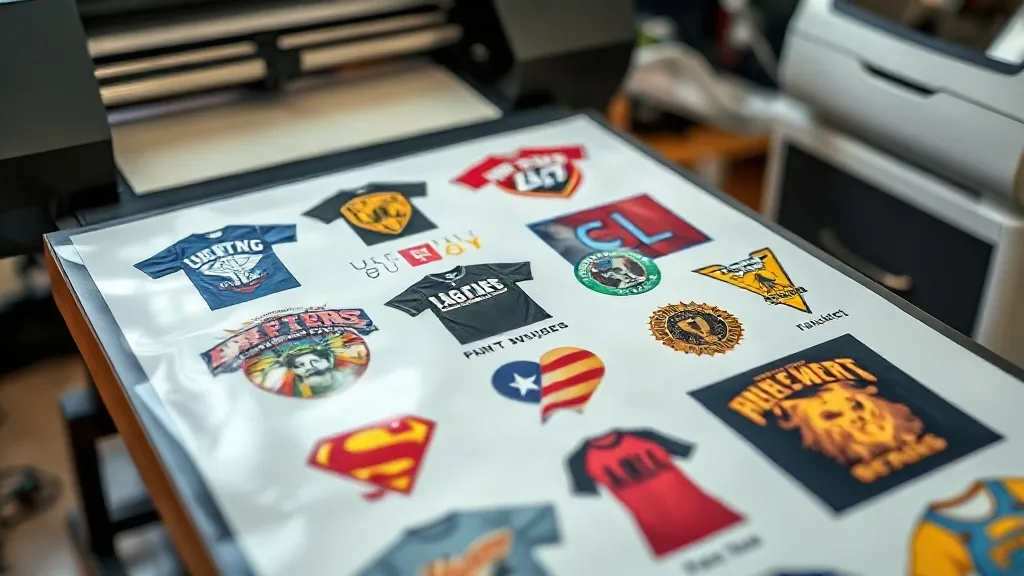
In simple terms, a DTF Gangsheet is a single large sheet of DTF transfer film that contains multiple printed designs arranged together. Instead of printing each design on its own separate sheet, you nest them efficiently on one large canvas. The goal is to maximize the use of every square inch of film, reducing waste and cutting down on the number of sheets you need to produce. For a print shop, this is not just a nice-to-have; it is a core cost-saving practice.
But here is where many shops go wrong: they treat gangsheets as a simple copy-paste job. They dump designs onto a sheet without considering ink usage, film width, or the cutting process. A well-built gangsheet, on the other hand, is a carefully planned layout that accounts for bleed, spacing, and the practical realities of weeding and pressing. If you want to see what a professionally built gangsheet looks like, take a look at this DTF Gangsheet example. Notice how the designs are arranged not just to fit, but to flow with the production process.
Why Gangsheets Matter More Than You Think
Let us talk numbers. DTF film is not cheap, and ink costs add up quickly. If you are printing one-off designs on individual sheets, you are paying for a lot of empty space. By grouping designs, you can reduce film waste by 20% to 40% depending on how well you nest them. That might not sound like much, but over hundreds of orders, it is the difference between a healthy profit margin and barely breaking even.
Beyond material savings, gangsheets streamline your workflow. Instead of loading the printer with a new sheet for every order, you can print a batch of designs in one go. This is especially important if you are running a print-on-demand business where speed is critical. The faster you can produce a sheet, the faster you can ship, and the happier your customers will be.
How to Build a Gangsheet That Works
Building a gangsheet is part art, part science. You need to think like a puzzle solver, but also like a production manager. Here are the key factors to consider.
1. Know Your Film Width
DTF film comes in various widths, typically 13, 17, 22, and 24 inches. Before you start placing designs, know the exact printable area of your film. Most printers have a small margin that cannot be printed on, so account for that. If you ignore this, you might end up with designs that are cut off or too close to the edge, leading to wasted film and reprints.
2. Group by Ink Color (When Possible)
This is an advanced tip that many shops overlook. If you have a batch of designs that use similar color palettes, group them together on the same sheet. Why? Because switching ink colors or running multiple color profiles on one sheet can increase ink consumption and slow down the printing process. By grouping similar colors, you can optimize the printer's output and reduce ink waste. Of course, this is not always possible, but when you can, it pays off.
3. Leave Enough Bleed and Spacing
Every design needs a little breathing room. Bleed ensures that when you cut the design, you do not accidentally trim into the printed area. A safe bet is to leave at least 0.1 to 0.2 inches of bleed around each design. Spacing between designs is equally important: it prevents colors from bleeding into each other during printing and makes cutting easier. If designs are too close, you risk damaging them when separating them from the sheet.
4. Consider the Cutting Process
How will you cut the gangsheet? By hand with scissors, with a plotter, or with a die-cut machine? Each method has different requirements. Hand cutting is more forgiving but slower, so you might want to leave more space between designs. Plotters and die-cutters require precise alignment, so you need to ensure that designs are placed with consistent margins. Always test your layout with a small batch before committing to a full sheet.
5. Use Nesting Software
If you are still manually dragging and dropping designs, you are wasting time and film. Nesting software automatically arranges designs to minimize waste, much like a jigsaw puzzle solver. These tools can rotate, flip, and reposition designs to find the most efficient layout. While there is a learning curve, the time savings and material reduction are worth it. Many DTF printer manufacturers offer proprietary nesting software, or you can invest in third-party solutions.
Common Mistakes to Avoid
Even experienced shops fall into these traps. Watch out for them.
- Overcrowding the sheet: Trying to squeeze in one more design can lead to misprints and cutting errors. Leave a little buffer.
- Ignoring grain direction: DTF film has a grain, and designs should be aligned with it for consistent stretching and durability. Placing designs sideways can cause them to crack or peel prematurely.
- Forgetting about the powder: After printing, you need to apply adhesive powder. If designs are too close, the powder can contaminate adjacent designs, leading to clogs and rough textures.
- Not accounting for shrinkage: Some fabrics shrink after washing, so if you are printing on shirts that will be washed, consider scaling designs slightly larger to compensate.
Gangsheets and Print-on-Demand: A Perfect Match
Print-on-demand (POD) businesses live and die by efficiency. With POD, you are often printing single items, which can be expensive if you do not optimize. Gangsheets allow you to batch multiple orders together, even if they are for different customers. For example, if you have five orders for a similar-sized design, you can place them all on one sheet, print once, and then cut them apart. This reduces setup time and material costs, making POD more viable for small shops.
Moreover, gangsheets give you the flexibility to offer more products without holding inventory. You can print a variety of designs on one sheet, and then apply them to blanks as orders come in. This is a game-changer for businesses that want to test new designs without committing to large print runs.
Choosing the Right Supplies for Your Gangsheets
Your gangsheet is only as good as the materials you use. Invest in high-quality DTF film and powder. Cheap film can cause ink smearing, poor adhesion, and inconsistent results. Similarly, the adhesive powder should be fine and evenly applied. If you are unsure which supplies to choose, consult with your printer manufacturer or a trusted supplier. They can recommend products that are compatible with your printer and produce reliable results.
Also, consider the fabric you are pressing onto. Different fabrics have different heat tolerances and textures. For example, 100% cotton shirts can handle higher temperatures, while blends may require lower settings. Always test a small sample before pressing a full gangsheet. This is especially important if you are using a new blank brand or a new fabric blend.
Frequently Asked Questions About DTF Gangsheets
How do I calculate the cost per design on a gangsheet?
To calculate cost per design, divide the total cost of the gangsheet (film, ink, powder, and labor) by the number of designs on the sheet. For example, if a sheet costs $10 to produce and contains 20 designs, each design costs $0.50. This helps you price your products accurately and identify opportunities to reduce costs.
Can I mix different design sizes on one gangsheet?
Absolutely. In fact, mixing sizes is a great way to fill gaps. Place larger designs first, then fill the remaining space with smaller ones. Nesting software can do this automatically, but even manually, you can achieve good results with a little planning.
What is the maximum size of a DTF gangsheet?
The maximum size depends on your printer and film width. Most printers can handle sheets up to 24 inches wide and several feet long, but check your printer's specifications. Some industrial printers can produce continuous rolls, but for most small shops, standard sheet sizes are sufficient.
How long can I store a printed gangsheet before using it?
Printed gangsheets should be stored in a cool, dry place away from direct sunlight. They can typically be stored for several weeks without significant degradation. However, for best results, use them within a few days. Always apply the adhesive powder before storing, and keep the sheet flat to prevent creasing.
Do I need special software to create a gangsheet?
While you can manually arrange designs in graphic design software like Photoshop or Illustrator, dedicated nesting software is more efficient. These tools are designed specifically for gangsheet layout and can save you hours of trial and error. Some are free, while others require a subscription, but the investment often pays for itself quickly.
Mastering the art of the DTF Gangsheet is one of the most effective ways to improve your print shop's efficiency and profitability. It requires a shift in mindset from thinking about individual prints to thinking about the entire sheet as a production unit. With practice and the right tools, you will wonder how you ever managed without them.